
A Project by Alice Zhang (Alice’s Website) & Aaron Long (Yours Truly)
Post-Mortem by Aaron
Copyright Disclaimer: under section 107 of the Copyright Act of 1976, allowance is made for “fair use” for purposes such as criticism, comment, news reporting, teaching, scholarship, education, and research. This project is a proof-of-concept, and as such does not represent nor infringe on the creator(s) in any way.
Introduction: Taking the First Steps into Games Localization
I enjoy video games. I enjoy languages. It should be no surprise then that I’ve decided to merge these two passions together and pursue a career in games localization. As I stood at the beginning of this new career adventure, I figured that there was no better way to launch this career than to just dive in head first. I teamed up with a friend of mine, Alice Zhang, and we decided to undertake a localization project together; we decided to take a simple game available online, and go through the whole process of localizing it, start to finish.
Long story short, we were successful in our adventure, but not without several challenges and unforseen issues. If you’re interested in reflecting on this journey with me and you’re more of a ‘watching’ kind of person, take a look at the video below. In it, you can listen to Alice and I reflect on our project and walk through the whole process. If videos aren’t your thing, I’ll go into more detail below it so just keep scrolling!
Oh, and if you ever feel like taking a gaming break, you can click this link to go to the game (make sure to click 中文 to see Alice’s and my hard work).
Link to Localized Game
Very Visual Video
The Written Version – Summary
Game Selection
Because of the internet’s infinite quantities of information and resources, we needed to set up parameters to extract a good game for the project out of all that noise. Because of my experience in JavaScript I suggested that we look for an open JS game. After scrolling through lots of GitHub entries, we settled upon this, a simple racing game. We chose it because there was plenty of text to localize and there didn’t appear to be anything too complex or out of the scope of our current abilities. The game also has English audio, which we were excited to try our hand at localizing.
Goals
Before beginning work, we discussed and wrote out goals for the project:
- Localize all strings into Chinese (Alice is a native speaker)
- Solve any text expansion and formatting issues
- Localize all English audio into Chinese
- Most importantly, make the Chinese version look good enough so that it is impossible to tell which version was the original one
- Second most importantly, don’t break the game
Tools
Below is everything we gathered and had at our disposal throughout the project:
- Visual Studio Code – for the coding
- 24Ways – for in-code string translation
- Google Drive – for file storage and collaboration
- Google Sheets – for translations, project tracking, and bug logging
- Microsoft Teams – for direct communication
- Google Speech Synthesis – for text-to-speech functionality
Workflow
Our ideal workflow looked something like this:
- Aaron extracts and wraps English strings in-code and sends them to Alice for translation through Google Sheets
- Alice translates the strings in the Google Sheet to Chinese
- Aaron reimplements the strings into the code using the appropriate ‘lang’ JSON file
- Alice QA checks the game and logs any bugs
- Aaron fixes bugs
- Repeat 4-5 until localization is complete
(Un)expected Challenges
While working, these were the issues we ran into and found ways to solve. You can read more about them in the challenges section further below.
- Text expansion and location were more complicated than expected
- Different word order in Chinese & English required special manipulation of the ‘rankings’ (i.e. 1st, 2nd, 3rd, etc.)
- English audio was not facilitated through audio files, as expected, but rather through Google Speech Synthesis, a browser-based text to speech engine; this came with several of its own problems
There’s the overview; next we’ll go into the details.
The Nitty Gritty – Step by Step Walkthrough
While I would love to say that our actual workflow followed our ideal workflow, these are the steps that took place while we worked through the project:
1. Making Sense of the Code
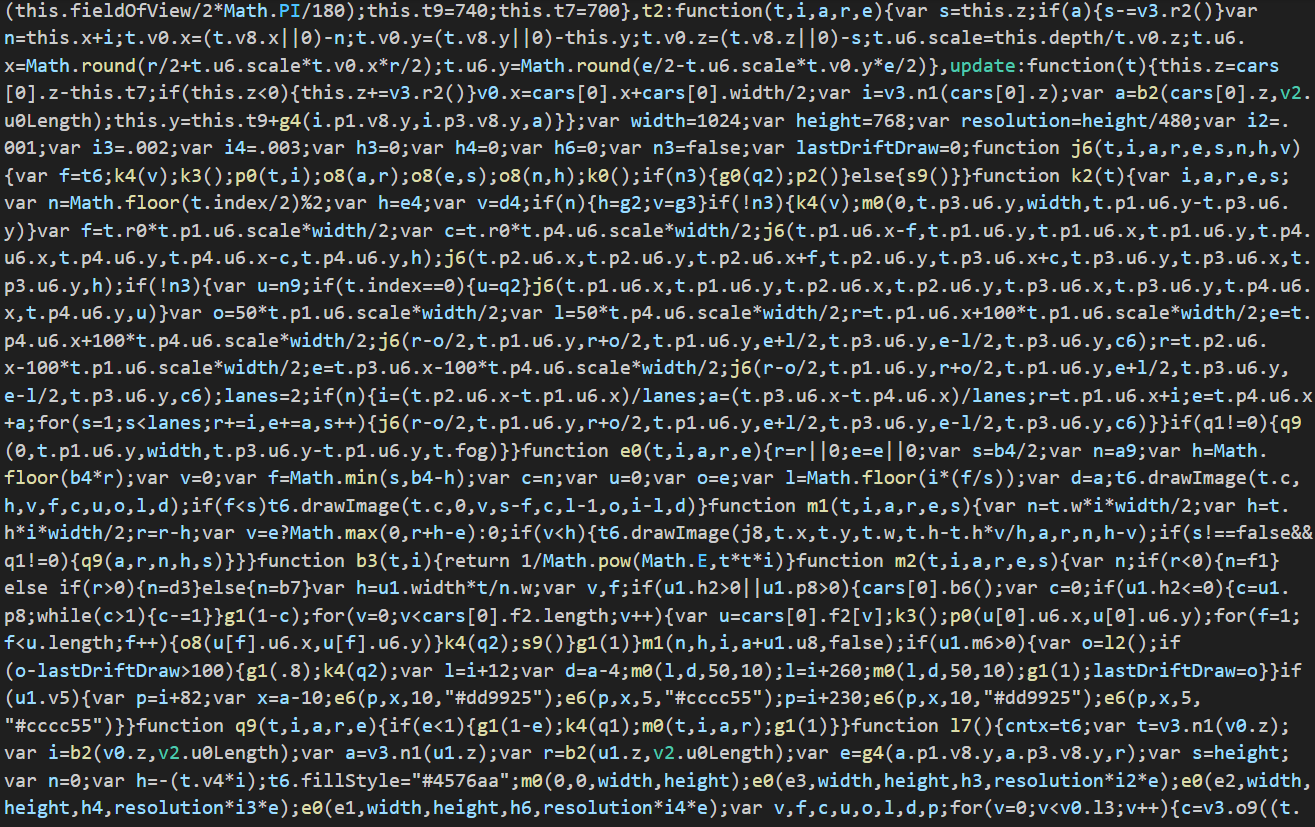
I have experience in JS, but am lacking when it comes to ‘build’ functionality. From what I understand, this is where a bunch of different and beautiful JS files are compiled and smashed together to form one compressed, albeit messy, file (first picture). Because of my lack of experience with ‘building’, I chose to edit the compiled file directly and first needed to separate out all the lines of code I wanted to work with (second picture). Thankfully, JS is forgiving when it comes to whitespace.
Having finished isolating all the text I needed, it was fairly simple to wrap the strings using ‘_( )’, provided by 24Ways and get ready to set up the langs JSON files (third picture).
2. Setting up and Implementing Translations
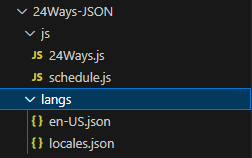
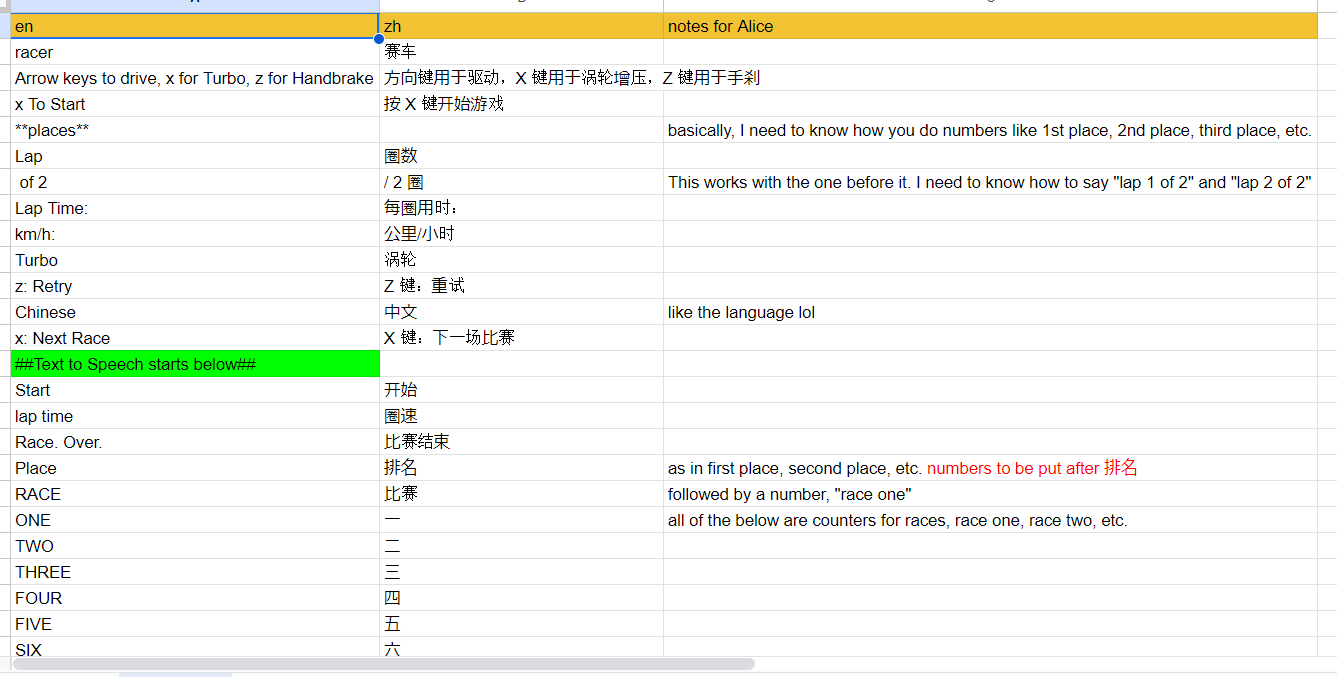
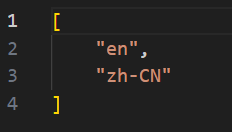
With all of the English strings wrapped, I needed to prepare a few things to make sure the translation would go smoothly. That is to say, I needed to copy and paste a lot of strings. The first place for pasting was shared Google Sheet so that Alice could translate (first picture). Then, I created a langs JSON file for Chinese and linked it up to the 24Ways ‘locales’ file (second picture).
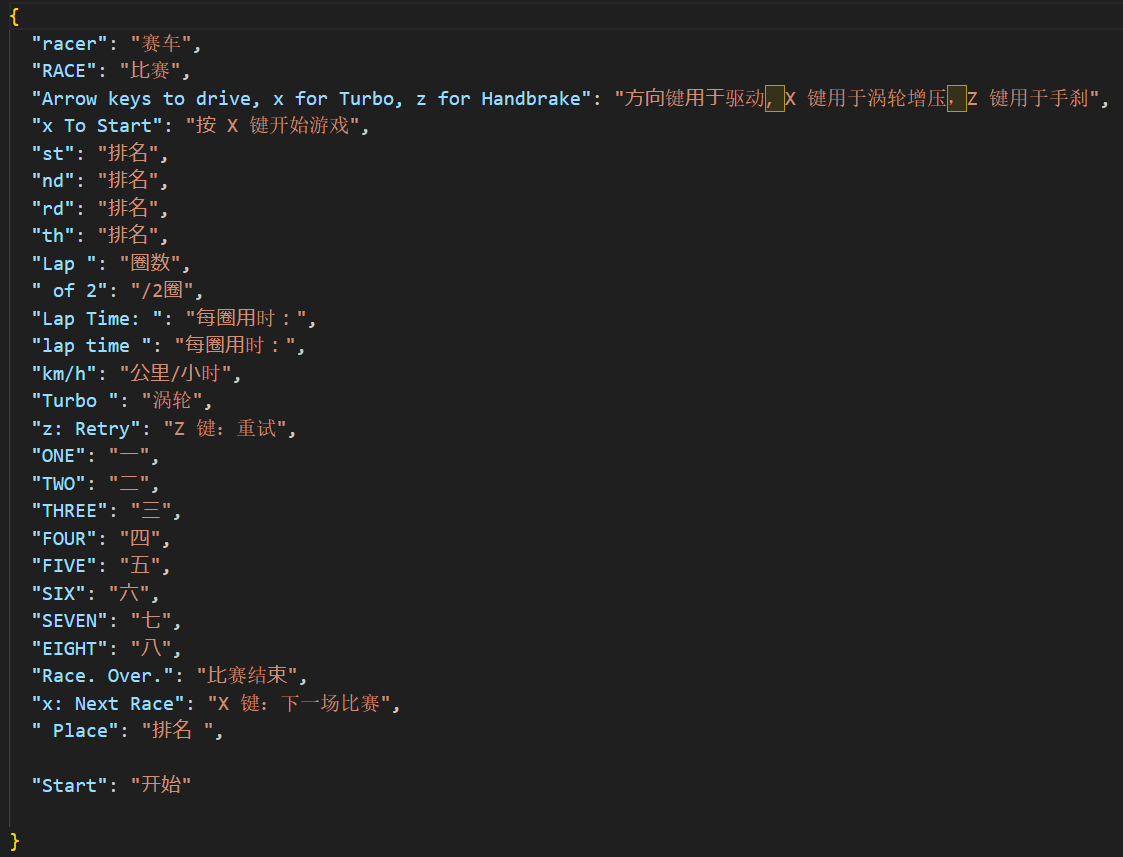
According to Alice, the translation wasn’t too complicated, and so I was able to populate my new zh-CN key-value JSON file quickly and simply (third picture).
3. Everything Looks Bad. What Do I Do?
One of my regrets of this project is that I didn’t take screenshots of the game after I first implemented the translation and tried playing the game. I will be more cognizant of that going forward. Nevertheless, let me paint you a picture with words: everything is overlapping everything; half of the text is too big and is getting cut off; and nothing is centered or aligned anymore. At least the game still worked; it was just ugly.
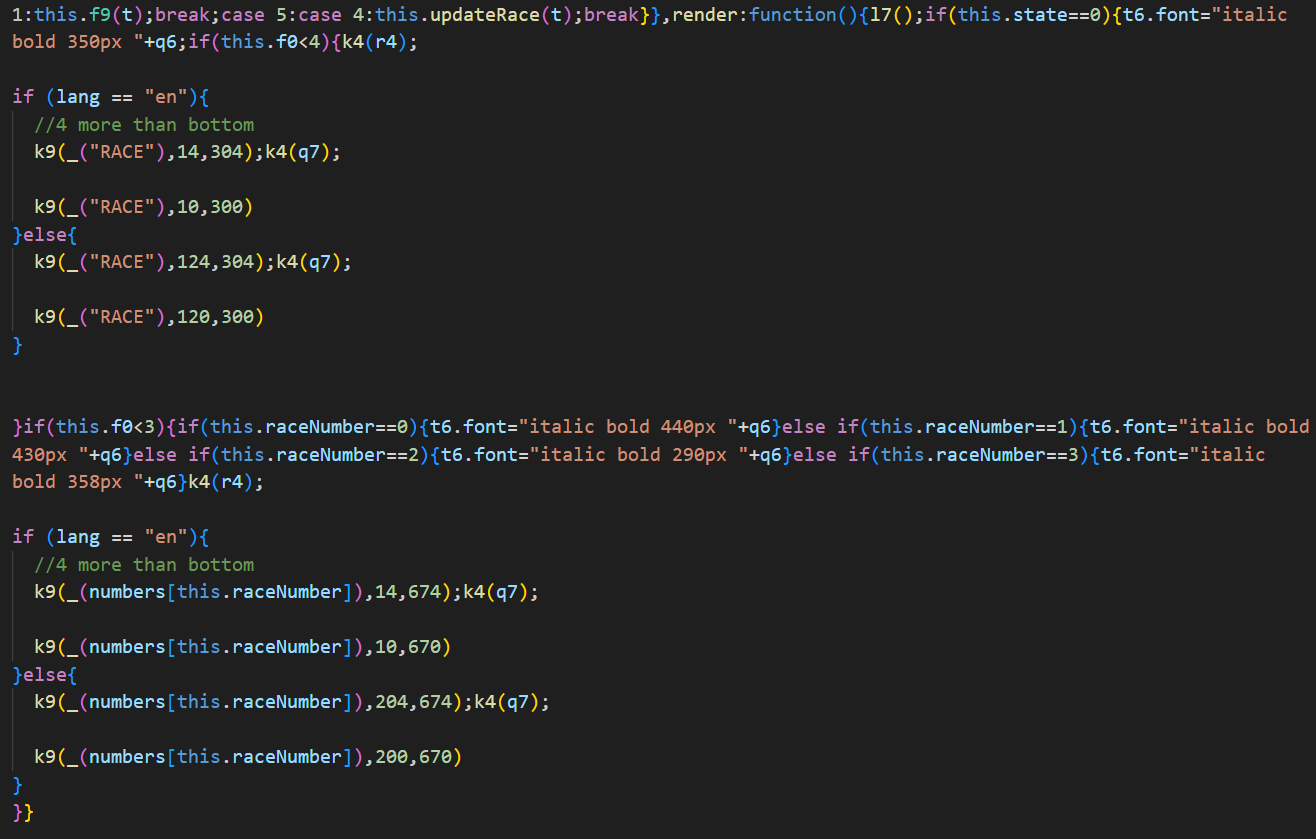
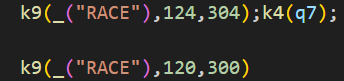
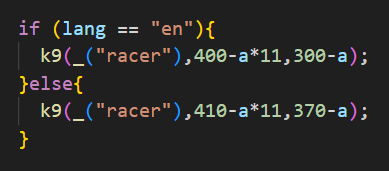
Cut to several hours of me testing the code to find the values that controlled both the size (second picture) and location (first picture) of the text. I’ll go into more detail here, but I eventually got everything in the right size and place. Spoiler alert, it involved me writing a lot of ‘if’ statements (second picture).
4. Why isn’t it saying anything?
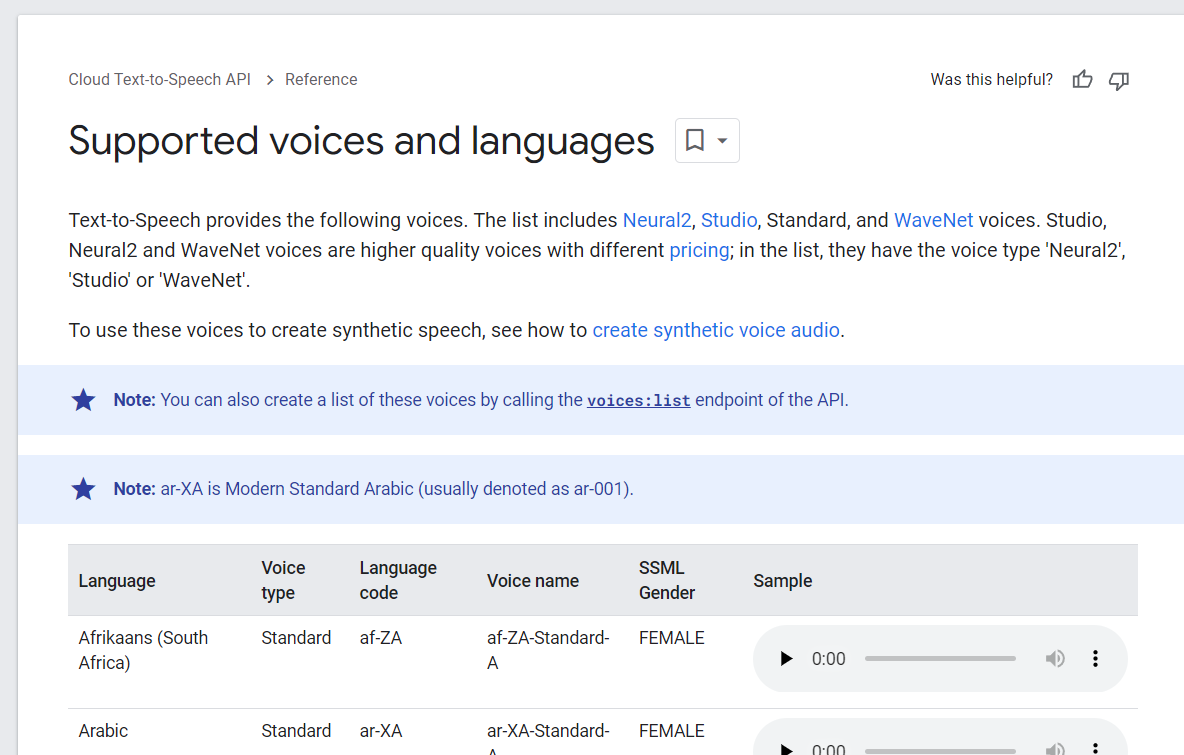
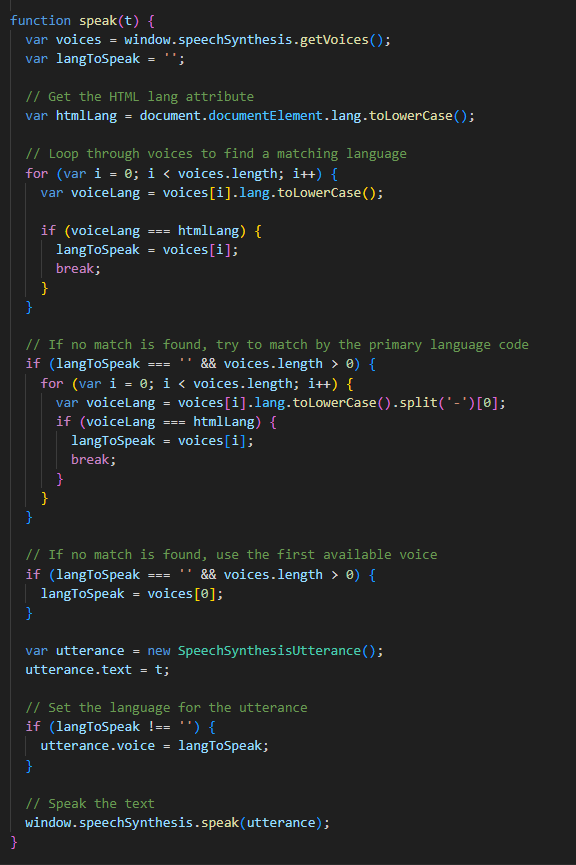
Originally, I figured the text to speech would just detect the Chinese and produce the text-to-speech sound output. I was wrong. Long story short, I had to mess about with the lang codes Google was looking for (first picture) and rewrite the in-code speaking function to look for whatever lang code the html document had (second picture). The program then looked through the available Google voices for a match and used that. Short story long here.
5. QA, QA, and then some more QA
Alice played the game a lot and tried to look for issues. She found two, one with the ‘ranking’ order of words, more on that later, and one with the text-to-speech working everywhere except for right at the start, where it would say “Start” in English with the Chinese voice and then say everything else in Chinese. I’ll elaborate on that further in the text-to-speech challenge section.
6. I think it’s good, but QA, QA, and then some more QA
You can never QA enough. Or can you?
7. Finalization – Waving the checkered flag
We finished it all up and recorded gameplay of both versions, English and Chinese. Take a look.
Challenges and Resolutions
Text Expansion and Location
The Problem:
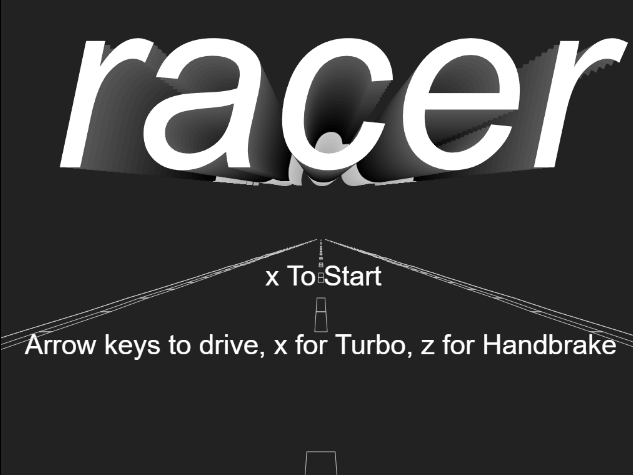
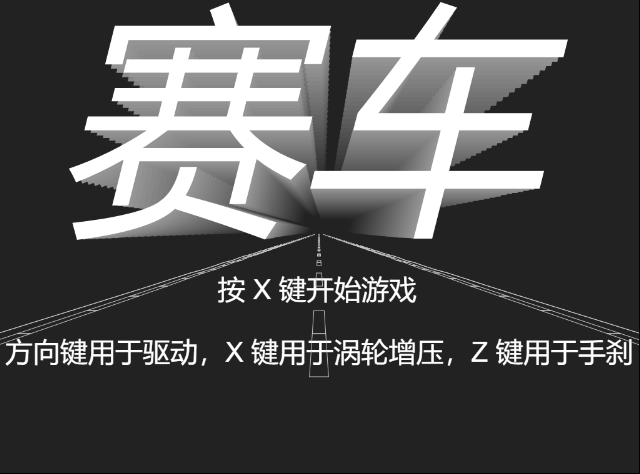
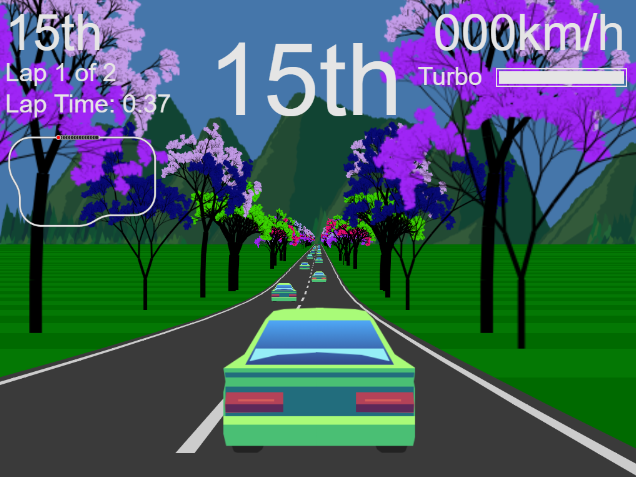
Below is a picture of it looking nice and pretty. As mentioned before, I regretfully do not have screenshots of the messy version, but I think you should be able to imagine how all of the text might be too big or overlapping or getting cut off.
The Solution
To be honest, I didn’t really have a good solution for solving this other than brute force. I’d go into the code, find a number next to one of the English strings and change it to see if it did anything. If I saw two numbers next to each other, I assumed, often correctly, that they controlled the x and y coordinates of the text in question. Again, I just brute forced my way through, changing and guessing until everything looked right. It did get easier as I went on because I got more of a sense of the size and coordinates, but it was still a long and tedious process.
I think this is where my lack of knowledge about the ‘build’ functionality really came back to hurt me. It would have been much easier to find all the size and location code in a neat and organized JS file, rather than the compiled and messy one I used. Next time, I will absolutely make sure that the code is in an easily understandable format before diving in, so as to not make a ton more work for myself.
Word Order in the Rankings
The Problem
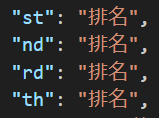
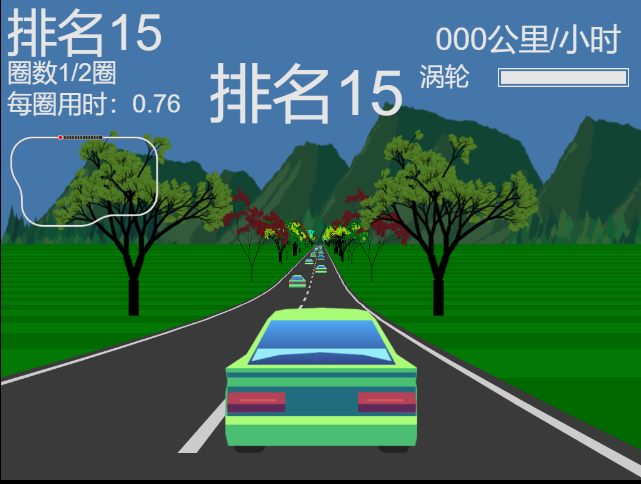
I have studied Japanese for a long time and it sometimes causes issues when I try to work with Chinese. For example, when writing placements (first, second, third, etc) in Japanese, it is written as ‘number + 位’ (1位、2位、3位など). I erroneously believed Chinese would function similarly and so I just changed all the English key-value endings for placements to be the Chinese word for place (second picture). This led to the place text appearing as ‘number + 排名’ and Alice subsequently informing me that everything was backwards.
The Solution
The solution was not as complex as I believed it would be. Functionally, I just needed to write something so that when the html document language was set to Chinese, it would flip the order (picture below). In other words, when in Chinese, the text needed to be st1, nd2, rd3, etc. This would then get translated with the key-value JSON to be 排名1, 排名2, 排名 (third picture above). Weird, but it worked.

All That Text-to-Speech Stuff
The Problems
As I eluded to before, I thought everything would be handled with audio files. I thought it would only require a simple hot swap of audio files and everything would go smoothly. Not so. The game relied on Google Speech Synthesis to create audio. That being the case I had to go in and figure out how all of it worked, and then make it work for Chinese. Doing so created two problems:
- The game was originally silent while in its Chinese version
- After we got the Chinese text-to-speech working, the audio would all work except for the very first “Start” line, which was being said in English in the Chinese text-to-speech voice
The Solutions
1 – The Silence of the Google
To solve 1, I essentially needed to rewrite the program’s text-to-speech function. As I understand it, the getVoices() command gives you a list of all the voices available within Google Speech Synthesis. You can then select a voice/language within that to use for text-to-speech. The original code used getVoices(), and then selected English directly from it. I needed a different function that would pull out a voice from getVoices() that would match whatever the html document lang code was.
To summarize, the code I wrote cycles through all of the getVoices() voices and finds one that matches. It then sets that voice to be the speaker for all the spoken text lines.
2 – ‘Start’ is apparently a Chinese word now
To solve 2, I just made a guess at a solution and it ended up working. I figured for whatever reason the “Start” text was loading before everything else. So, I put the lang and voices variables all the way at the top of the code. It worked and didn’t break anything else, so I decided not to think too much more about it.

Final Thoughts
All said and done, I’m happy and proud to announce that the project was a success. Despite all the text-to-speech woes and the size/location tedium, we were able to localize the game well. The final project runs as good as the original and, in my opinion, looks as good as the original too. That doesn’t mean, however, that I would go about everything in the same way, as I’m sure you can tell by now after reading this whole post-mortem.
What went well and (probably) doesn’t need changing:
- String wrapping and externalization – After I made sense of the code, wrapping the strings and putting them into the appropriate places on Google Sheets and in the appropriate JSON file was straightforward and didn’t take long.
- Translation – The translation was by far the easiest part. Alice had no trouble translating and leaving helpful comments.
- Communication – Alice and I were on the same page and kept each other well-informed for the whole process.
- 24Ways worked great with text-to-speech – When I wrapped the spoken English strings, it translated them first and then shipped them off to the speak() function without any extra input from me.
What didn’t go well and (definitely) needs changing:
- I need to figure out how that JS files are compiled into that messy form. I never want to deal with that messy, lumped together kind of code again.
- Find a better system of figuring out the size and location of text other than just plug ‘n’ play
- For convenience, I wrote every ‘if’ statement utilizing ‘else’ for Chinese. I should have used an ‘else if’ statement, which would have more easily allowed additional languages to be added down the line.
- When you click to switch the game into Chinese, it misaligns the English words before putting it all into nice-looking Chinese. I don’t know if this is a limitation of 24Ways or if there was something I could do to prevent it from happening.
If you’ve made it this far, thanks so much for reading! In the future, I intend to tackle more complex projects, perhaps localizing Japanese indie games into English. Stay tuned with my Projects page!